You do not need the most complicated system available. You need one that solves the problems your team actually has. This article is for business owners and HR teams who want to spend less time fixing benefits administration and make the process easier to manage as the company grows.
Key Takeaways
- Benefits technology reduces repetitive HR work around enrollment, eligibility changes, employee records, and routine benefits tasks.
- HR and payroll connections can reduce duplicate entry and help keep benefit elections and deductions aligned.
- Digital enrollment gives employees easier access to plan information, coverage choices, and benefit records.
- Self-service tools can reduce routine questions by letting employees find common benefits information themselves.
- The right platform should fit your existing systems, not create another disconnected process.
- Compare usability, integrations, reporting, support, security, and room to grow, not just the number of features.
What Is Benefits Technology?
Benefits technology is software used to organize and administer employee benefits. Depending on the platform, it may handle enrollment, eligibility, dependents, benefit elections, payroll deductions, reporting, and employee self-service. Some systems also connect with payroll or an HR information system, often called an HRIS. Businesses evaluating benefits administration technology should look beyond online enrollment and ask how information moves between the tools they already use. For a small HR team, the goal is simple: fewer repeated tasks and fewer places to enter the same information twice.
How Benefits Technology Helps Small Businesses
Benefits technology is most useful when it fixes everyday administrative problems. A good setup should make routine work easier for HR while giving employees a clearer way to manage their benefits.
Cuts Down Manual Benefits Work
Manual benefits administration can mean collecting forms, updating dependents, tracking eligibility, recording life-event changes, and entering the same employee information more than once. Technology can move many of those steps into a consistent digital process. HR still needs oversight, but staff can spend less time chasing forms or copying data between systems.
Connects Benefits With HR and Payroll
A benefit election may affect payroll deductions, employee records, eligibility, and carrier information. When systems can exchange the right data, HR may not need to enter the same change several times. That can reduce mismatches between benefit elections and payroll deductions. Before choosing a platform, check exactly what each integration does. A listed payroll connection does not always mean every field or update moves automatically.
Makes Enrollment Easier to Manage
Digital enrollment gives employees one place to review plans, compare costs, add dependents, make elections, and confirm their choices. For HR, that can replace paper forms and email attachments with organized enrollment records. It also makes it easier to see who completed enrollment and who still needs follow-up. The best setup is one employees can understand without calling HR at every step.
Gives Employees More Self-Service Access
Employees often ask simple questions: Which plan did I choose? Where is the plan document? Is my dependent listed? A self-service portal can give them direct access to common benefits information without requiring HR to answer every request. That does not replace employee education. People still need clear explanations when choosing coverage. Self-service simply makes routine information easier to find later.
Where Benefits Technology Can Reduce Errors
Benefits errors often happen when information moves from one process to another. An enrollment election may need to reach payroll. A new hire has to be added to the right systems. A life-event change may affect both coverage and deductions. Technology can help standardize those steps and keep records better aligned. Common areas to watch include:
- Eligibility dates and employee status
- Dependent information
- Benefit elections
- Payroll deductions
- Life-event changes
- Enrollment records
Software does not guarantee compliance or remove the need for review. Employers still need accurate plan rules, sound procedures, and people who understand the benefits program.
What Should a Small Business Look for in Benefits Technology?
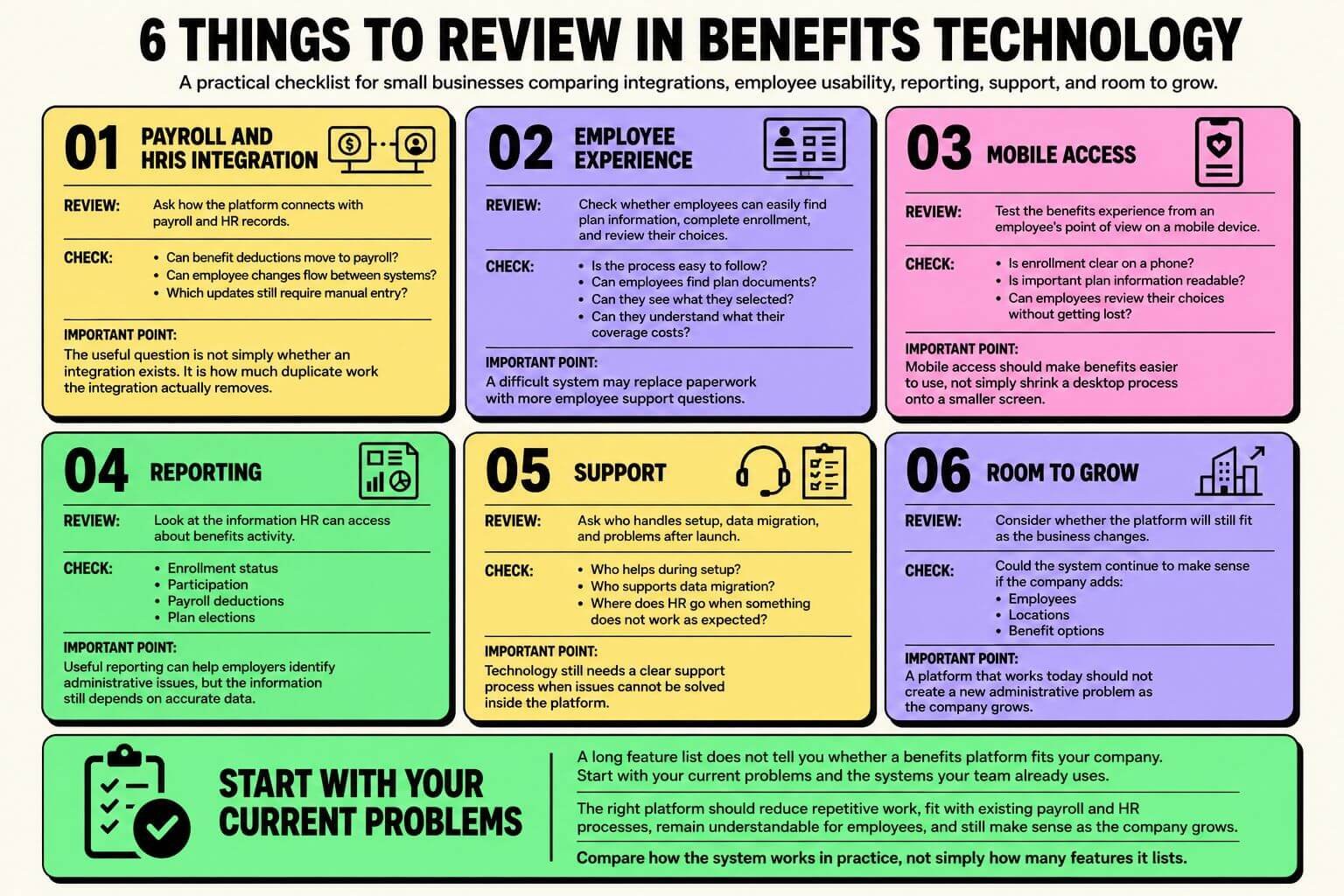
A long feature list does not tell you whether a platform fits your company. Start with your current problems and the systems your team already uses.
Payroll and HRIS Integration
Ask how the platform connects with payroll and HR records. Can it send benefit deductions to payroll? Can employee changes flow between systems? Which updates still require manual entry? The useful question is not simply whether an integration exists. It is how much duplicate work that integration actually removes.
Employee Experience and Mobile Access
Employees should be able to find plan information, complete enrollment, and review their choices without getting lost. Check the process from an employee’s point of view. Is it clear on a phone? Are plan documents easy to find? Can employees see what they selected and what it costs? If the system is difficult to use, HR may simply trade paperwork for more support questions.
Reporting, Support, and Room to Grow
Look at reporting for enrollment status, participation, deductions, and plan elections. Cleaner data can also support broader benefits cost control by helping employers spot administrative issues. Ask who handles setup, data migration, and problems after launch. Then think ahead. A platform that works now should still make sense if you add employees, locations, or benefit options.
When Does a Small Business Need Benefits Technology?
There is no employee count that automatically tells you when to adopt a platform. A business with a handful of employees and one simple benefit may have very different needs from a growing company offering several plans. It may be time to review your process if:
- Enrollment relies heavily on spreadsheets, PDFs, or email.
- The same employee data is entered in several places.
- Payroll deductions need frequent manual corrections.
- Employees rely on HR for basic plan information.
- Reporting requires pulling data from several systems.
- Growth is making a once-simple process harder to control.
The U.S. Small Business Administration’s 2025 South Carolina profile reports 530,402 small businesses in the state, employing 863,326 people, or 42.9% of South Carolina employees. For employers with lean administrative teams, cutting repetitive benefits work can matter even without a large HR department. Benefits administration usually becomes harder one step at a time. A spreadsheet works until you add another plan. Manual deductions work until an enrollment change gets missed. One person can answer every benefits question until the team grows and those questions take up more of the week.
That does not mean every employer needs an advanced HR platform. Start by mapping your current process. Look at where employee data is entered, how benefit elections reach payroll, how employees find plan details, and how changes are documented. Benni Agency can help employers review how technology fits into their broader employee benefits services without treating software as a separate project. The goal should be a setup that fits the benefits and systems you already use.